
Say it
Say it all out loud. We'll sort it.
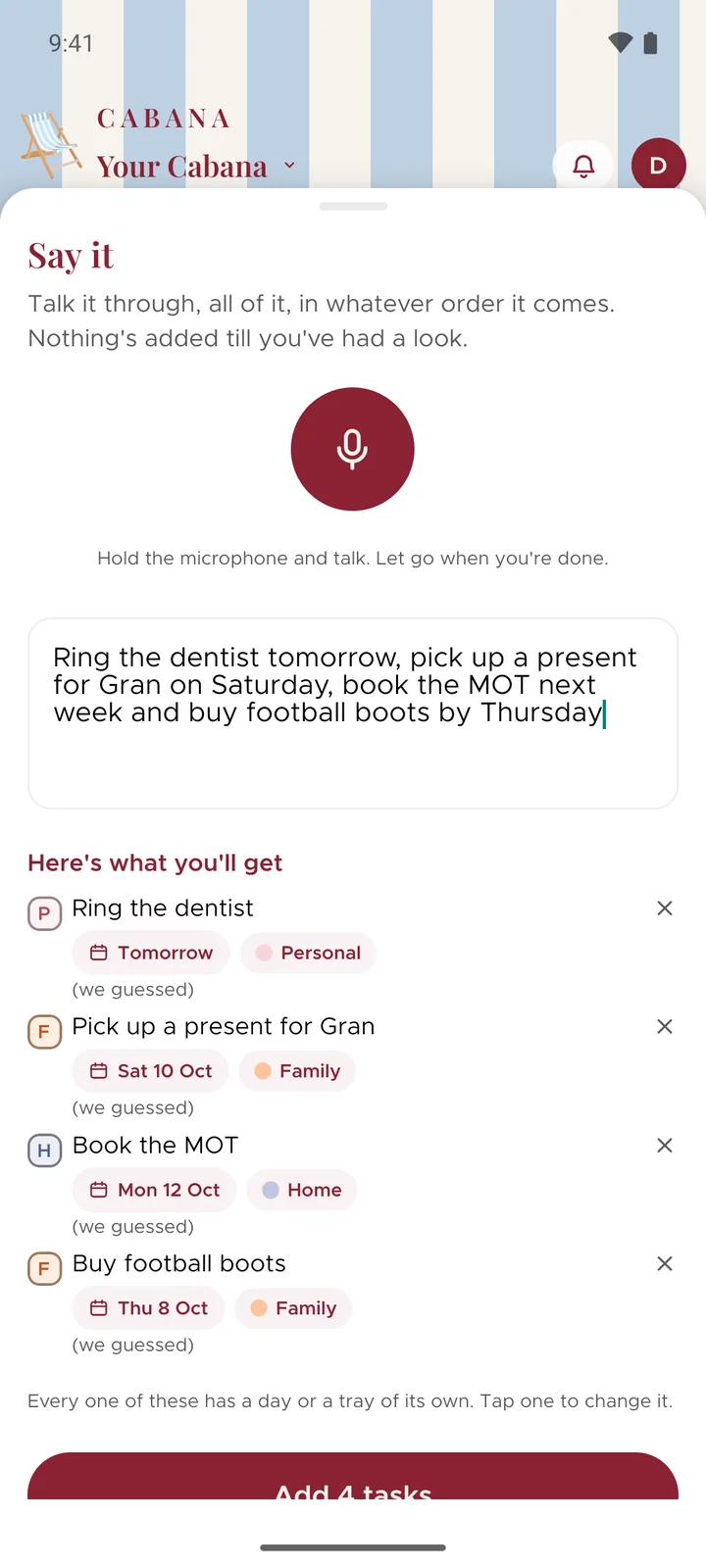
Talk through everything on your mind, in whatever order it comes out. Cabana turns it into tasks and puts each one on the day you said, and nothing's added till you've had a look.
On iPhone, Android and the website
How it works
Open Say it
It's in the + menu. On your phone, hold the microphone down and talk, like sending a voice note. Let go when you're done.
Ramble a bit
"Ring the dentist tomorrow, pick up a present for Gran on Saturday, book the MOT next week." No need to be tidy about it.
Have a look, then add
Every task turns up with its day and its category. Change anything that's not quite right, then add the lot in one go.
Good to know
- The sound stays on your phone
- On iPhone and Android the listening happens on the phone itself. Only the words come to us, to be turned into tasks. On the website it's your browser that listens.
- Changed your mind mid-sentence?
- Slide left to cancel. Slide up and it keeps listening without you holding the button, for a longer ramble.
- Quicker ways in
- On an iPhone with iOS 18 you can put Say it in Control Centre, on the Lock Screen or on the Action button, and it opens already listening. Or ask Siri to "Add to my Cabana" and it goes straight on your plan without you touching your phone. On Android, hold the Cabana icon for a shortcut, or add the Say it tile to Quick Settings.