
Your calendar in Cabana
See what's already on your calendar at the top of each day, and turn any of it into a task.
Updated on 3 November 2026
Turn it on
It starts on your phone, because that's where your calendars are. In the app, tap your initial at the top, choose Your calendar, then Show my calendar. Your phone asks whether Cabana may read your calendar, and once you say yes, your main ones are picked for you.
Pick up to three under Which calendars?. Any calendar your phone's own calendar app shows can be one of them.
What you'll see
Each day's events sit faintly at the top of it, all-day ones first and then by time. They're not tasks, so there's nothing to tick. In the month, a little dot says a day has something on.
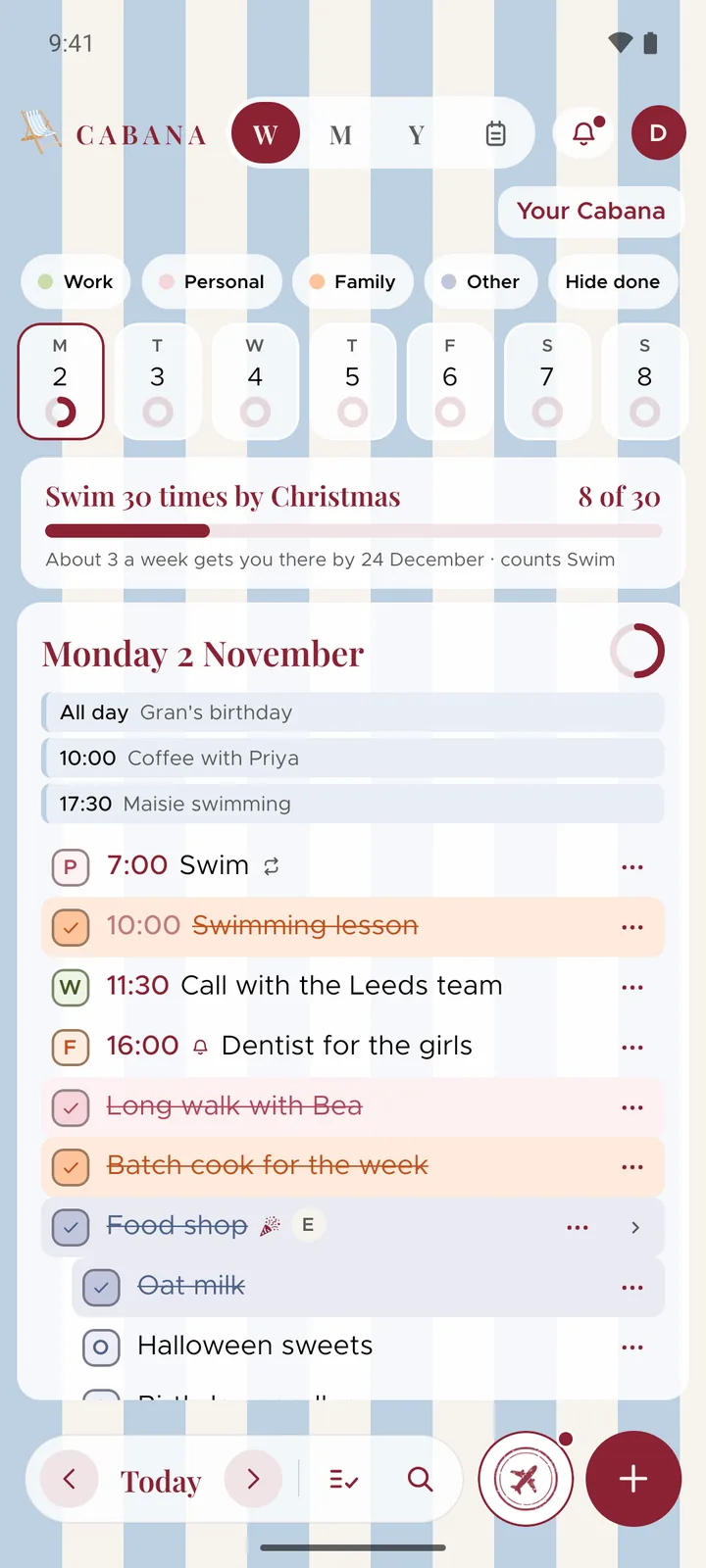
Press an event and choose Make it a task to add a task on that day, in the event's words and at its time.
On the website
Your phone sends Cabana a copy of what it reads, from a week back to six weeks ahead, so the website shows the same events. It reads again each time you open the app and every quarter of an hour while it's open. There's nothing to turn on at the website: it shows whatever your phone last sent.
Only yours
Only you see your calendar. Nobody you share a plan with sees it, and it's never part of a plan, a share link or a widget. The copy is kept encrypted, and Turn it off in Your calendar deletes it.